
Buying a monitor? Please refer to this post before purchasing.
New user? Register here.
- AuthorPosts
- October 27, 2025 at 6:17 am #77447
 sblantipodi
Hi there,
I need another monitor and I’m considering buying the
Asus PG32UCDMZ.There is the PG32UCDMR with DP 2.1 but I don’t think that the updated display port worth the extra money.
Is there something new that I should wait for?
Is 4th gen 32 inch announced? Is it worth to wait for them?October 27, 2025 at 6:21 am #77449 PCM2
PCM2I think now is as good a time as any to buy one. No ‘4th gen’ ~32″ models have been announced and I wouldn’t expect any tangible benefits if they were, which is likely why Samsung Display isn’t in a rush to refresh that panel. The 4th gen models (~27″ ‘4K’ UHD like the XG27UCDMG and MPG 272URX etc. ) perform very similarly to their ~32″ counterparts, aside of course from the screen size difference and the things that go with that. I couldn’t say whether they’re more resilient to burn-in, that entirely remains to be seen and isn’t something I can test myself.
I also agree that DP 2.1 is worth more marketing points than actual practical value, having used various monitors that do and don’t feature it now with my RTX 5090.
October 27, 2025 at 9:57 am #77450sblantipodiOctober 27, 2025 at 10:07 am #77454PCM2I’m not sure about that either. They both offer the “ASUS OLED Care Pro” settings and have a Neo Proximity sensor, according to the text at the top. But then there’s no further mention of that on the “UCDMZ” page, whereas there is for the “UCDMR” page. They also mention “Proximity sensor” for the specs but not “Neo Proximity Sensor”. So I’d assume it doesn’t have the newer “ASUS OLED Care Pro” features, just the original set. The taskbar detection feature was one of the “Pro” features I found quite useful, but I’m not really sure how much of a difference it actually makes if you use it vs. don’t use it. I guess every little helps – but is it worth paying more for? Tough question.
February 1, 2026 at 10:58 am #77604 radosuaf
I will chip in here not to create a new topic… Any chances for Lenovo Pro Q27-10 review? It’s very well priced but I cannot find any tests on this.
February 1, 2026 at 11:02 am #77608PCM2No current plans, but will consider it as a possible future review (and see if Lenovo can provide a sample).
February 1, 2026 at 12:40 pm #77609radosuafOLEDs are showing up in reasonable price brackets, there’s also Q27G41ZDF priced slightly lower, but factory calibration and adjustable brightness in sRGB mode make Lenovo particularly interesting. But I’m completely new to OLEDs, so not sure what to look for exactly.
February 1, 2026 at 1:01 pm #77612PCM2I’d say a more noteworthy difference is that the Q27G241ZDF (what a terrible name*) features one of the cheaper lower brightness QD-OLED panels, incapable of passing the VESA DisplayHDR True Black 400 certification and peaking ~400 nits for HDR rather than ~1000 nits. SDR should peak ~200 nits rather than the usual ~250 nits+.
*Speaking of terrible names, the Q27-10 is a recycled name, Lenovo used it for an IPS model as well. Although technically that wasn’t a “Legion Pro” series model.
February 1, 2026 at 8:14 pm #77613radosuafI did a bit more research and in the bracket up to 430 EUR what I can find is:
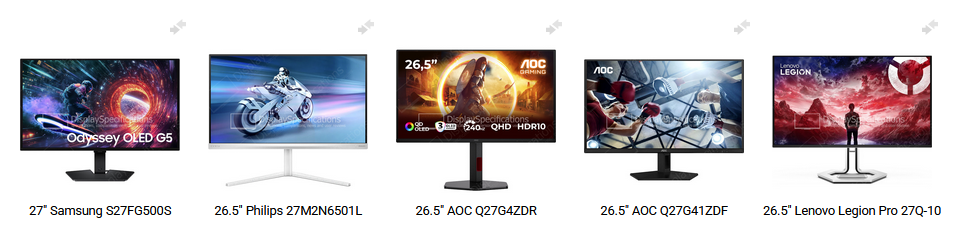
Checking peak brightness, only Lenovo and Q27G4ZDR seem to be hitting 1000. Q27-10 makes little sense when the IPS is named (almost) identically, but there MUST be something behind that choice :).
February 1, 2026 at 8:19 pm #77617PCM2That listing is incorrect. The Q27G4ZDR also peaks at 400 nits HDR / ~200 nits SDR and uses the same reduced brightness panel as the other models (except the Lenovo). Maybe the creator of the listing was confused with the Q27G4SDR specs, as that is a 360Hz model featuring a higher brightness QD-OLED panel.
February 1, 2026 at 9:12 pm #77619radosuafSo that makes Lenovo generally the only choice in that price category… Let’s hope somebody lays his hands on it.
February 1, 2026 at 9:12 pm #77621PCM2🙂
February 3, 2026 at 7:13 am #77622radosuafHmmm… I just recalled I use this monitor for work as well, working from home for 2 days a week and I do have the taskbar visible and I do use the light mode. So potentially there is a risk of burn-in. And Lenovo seems to be sort of reluctant to cover that. In Poland, where I live, AOC seems to be most straightforward with a 3 year warranty, for sure AGON PRO AG276QZD2 is covered. I know there’s an extensive coverage on this one on the site, I watched first 20 minutes or so, need to watch the rest. And I also like it has 2 DP ports that would let me have both the dock for the laptop and my PC hooked without switching to HDMI. Is there a chance the Q27-10 will be sustantially better?
February 3, 2026 at 7:17 am #77625PCM2The AG276QZD2 uses the same panel as the Lenovo, so there’s no chance the Lenovo would be substantially better. The features differ and my main complaint about the AOC was undercoverage of the gamut under HDR (leading to undersaturation), though that could be corrected to a satisfactory degree using Windows HDR Calibration tool or by increasing Nvidia Digital Vibrance. If I recall correctly you use Linux so that isn’t an option, but I wouldn’t say things are too bad even in the “uncorrected” state and I’m not sure how often you’ll be using HDR anyway. I think the warranty coverage is more important in this case, really.
February 3, 2026 at 9:22 am #77627radosuafI’m dual booting and I generally lean towards Windows for gaming (for now xD), but to be honest, I prefer SDR to HDR.
I use an AMD card and will probably continue to do so (Linux),so no Digital Vibrance for me, but it sound like the HDR issue is a software one, wasn’t it somehow resolved since your review? I’ve read there’s a newer revision with 280 Hz and there were numerous firmware updates to the monitor…
February 3, 2026 at 9:23 am #77628radosuafBTW, I watched AOC Q27G3XMN & AG276QZD2 yesterday and the amount of detail you put into testing is just astonishing. Probably the best monitor reviews out there (although, I have to say, seeing an over hour long review makes you scared at the very beginning :). Impressive work and dedication.
February 3, 2026 at 9:29 am #77632PCM2Ah yes, intimidating on the outside but interesting and informative once you get into them is what I’m going for with the video reviews! 😉 Actually looking at the analytics, I’m quite surprised how many people do stay until the end. And quite a few people jump around (I make sure everything is timestamped) to see the bits they’re interested in, or sometimes skip to the conclusion. I’m fine with all of that, as long as people are getting some value from them (and they are) I’m happy. 😀
The gamut undercoverage issue is actually something I’ve seen on all AOC OLED models I’ve looked at so far. The AG276UZD being the most recent, back in July last year. I’ve made AOC’s technical teams aware of the issue but I’m not sure if they’ve actually rectified it. Maybe they have and maybe the new revisions (including of the AG276QZD2) are fine. Either way, I wouldn’t say it’s a huge issue – especially if you’re only occasionally using HDR.
February 3, 2026 at 2:17 pm #77633radosuafThe website clearly says it’s HDMI 2.1 and 280 Hz now:
https://aoc.com/uk/gaming/monitors/ag276qzd2#productSpecificationsThe question is if anything changed in HDR performance… The other how can I make sure I order the new version. I guess huge retailers would have the knowledge what they’re actually selling.
February 10, 2026 at 9:45 am #77646radosuafOK, doing some research and new fear unlocked: SCRATCHES. Since you had many OLEDs for testing, is that a real issue? Are there any brands that have more durable coating?
February 10, 2026 at 9:52 am #77648PCM2I’ve yet to scratch a glossy QD-OLED and have cleaned many. Just use a microfibre cloth that isn’t dirty and it shouldn’t be a problem – doesn’t have to be brand new, but freshly washed or one you’re confident is free from hard debris. Smearing can be more of an issue when cleaning and for this reason Samsung Display advises using a 70% IPA (Isopropyl Alcohol or rubbing alcohol, not India Pale Ale) or 70% ethanol solution to clean QD-OLEDs.
If it’s a particular concern then matte QD-OLEDs (Samsung models) are naturally more scratch-resistant. And so are WOLEDs, whether glossy or matte. Samsung has also switched to a more resistant glossy anti-reflective surface for their newest QD-OLED panels. Monitor manufacturers use their own branding (e.g. ‘ObsidianShield’, ‘DarkArmor’ and ‘BlackShield’) for this, but it’s part of the panel. Samsung claims it’s 2.5x as scratch-resistant as their regular glossy QD-OLED surface. It’s something you’ll see on their new VESA DisplayHDR True Black 500 compliant 360Hz QD-OLED ultrawides (e.g. MPG 341CQR QD-OLED X36) and their updated ~32″ ‘4K’ UHD models (e.g. Gigabyte MO32U24).
- AuthorPosts
- You must be logged in to reply to this topic.